






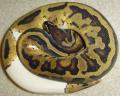
Just to show what I mean, I took a picture of one of my Pastel Hypo het for Pied girls with three different cameras. I took one picture with my Samsung S5 (smart phone), one with my Nikon Coolpix L28 (a point and shoot small camera), and one with my Canon Rebel XT. I left my Canon Rebel XT's settings the same as I use under my light kit. My light kit has lights that are full spectrum and 5000K while my snake room has typical house hold compact fluorescent lights (CFLs) that are 2700K. Here is all the editing that I did to make this comparison picture. I imported the RAW file from the Canon Rebel XT into Adobe Lightroom. I cropped the picture to 8 x 10 ratio. I then saved a copy of the picture as a jpeg with the white balance set for my light kit (this is the bottom right picture and looks very yellow because the lights in the room are 2700K and not 5000K like the lights in my light kit, by the way, if a camera or smart phone is in fully automatic, it adjusts the white balance on its own, whether you are inside under fluorescent lights, CFLs, incandescent lights, or out in the sun). I then (still in Lightroom) used the eyedropper to pick the neutral grey on the WhiBal card so that the white balance would be adjusted (this is the bottom left picture). I then saved a copy of the picture as a jpeg with the white balance corrected. I then opened Adobe Photoshop Elements 8.0 and cropped the picture taken by the Samsung S5 to an 8 x 10 ratio (top right picture). I then in Photoshop Elements 8.0 cropped the picture taken by the Nikon Coolpix L28 to an 8 x 10 ratio (top left picture). Finally, still in Photoshop Elements 8.0, I put all four pictures together so that they can be viewed and compared at once.
The Pastel Hypo het Pied was in a freshly cleaned tub (I cleaned all my tubs last night), but what would it matter if I had her on a clean background? Would that really make it a "glamour shot"? What any of us should try to do is capture the true colors of the snake so that a customer is pleased when they open up the box and see their new animal. If we choose to present the animal on a clean background, or in a clean tub, does it really make a difference?



 Reply With Quote